> ## Documentation Index
> Fetch the complete documentation index at: https://docs.mcpjungle.com/llms.txt
> Use this file to discover all available pages before exploring further.
# Dashboard UI
> Manage mcp servers through the mcpjungle Dashboard UI
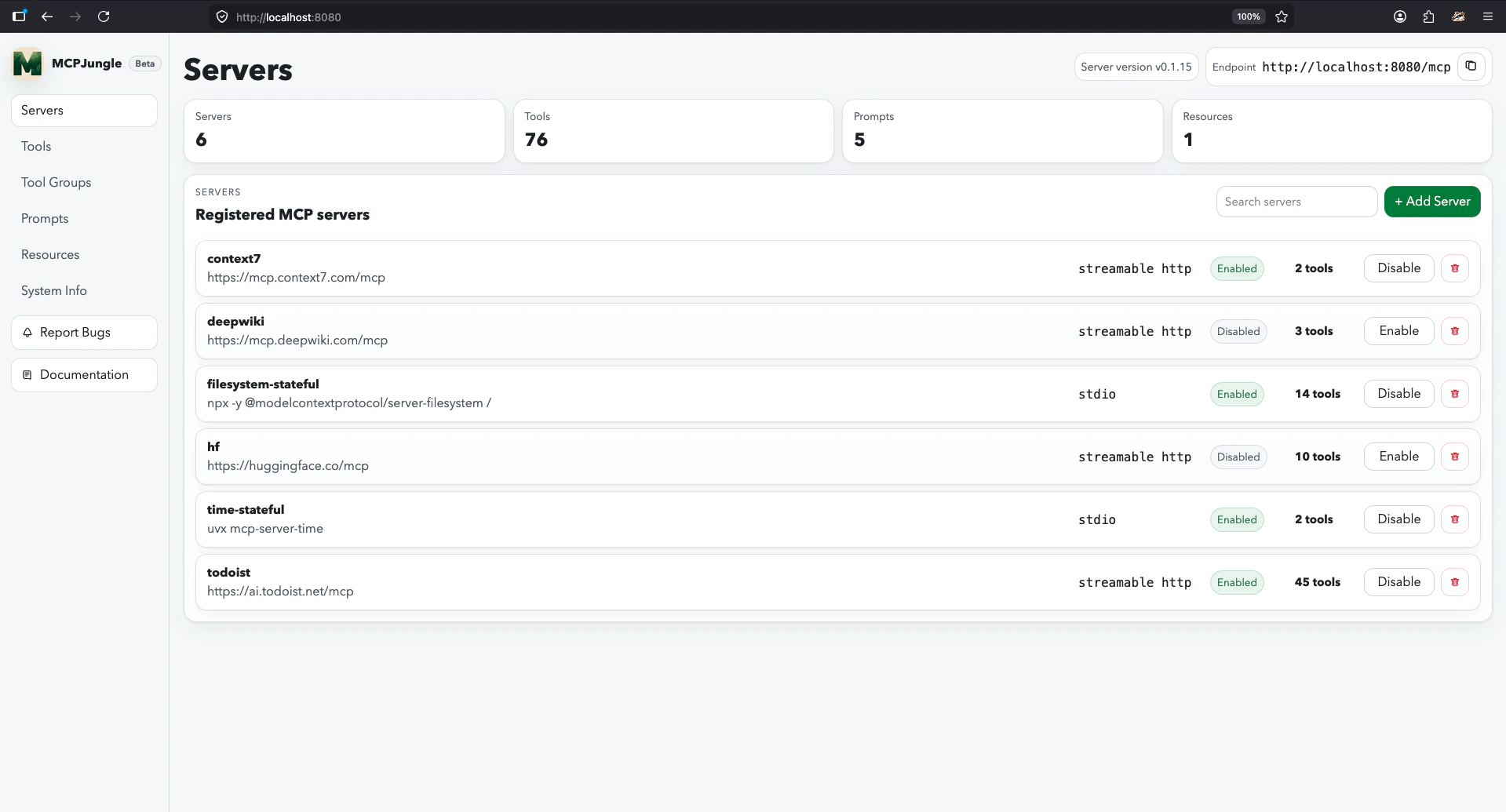
Mcpjungle let you manage your MCP servers and other entities through a Web UI.
Once your server is running, you can open this dashboard in your browser at [http://localhost:8080/](http://localhost:8080/) or whatever port the server process is listening on.
 The Dashboard is currently only supported when running mcpjungle in [development mode](/core-concepts#development-mode-vs-enterprise-mode).
Dashboard is currently a Beta feature. The CLI remains the most complete management interface today, and the Dashboard UI is also available for local/dev visibility and common management tasks.
Please report any issues or feedback you have.
The Dashboard is currently only supported when running mcpjungle in [development mode](/core-concepts#development-mode-vs-enterprise-mode).
Dashboard is currently a Beta feature. The CLI remains the most complete management interface today, and the Dashboard UI is also available for local/dev visibility and common management tasks.
Please report any issues or feedback you have.